Invoice processing automation replaces manual data entry with software that reads each invoice, pulls out the vendor, amount, and due date, and hands you structured data instead of a stack of PDFs. For a small business, it turns a 20-to-30-minute task into one that takes under two minutes.
That gap is the whole business case. Nobody enjoys retyping the same fields off a hundred invoices a month, and the errors that creep in from doing it by hand (a transposed digit, a missed due date) cost more than the time itself.
What manual invoice processing actually costs
Small teams underestimate this because the cost is spread across many small tasks instead of one big one. Receiving the invoice, sorting it, keying the vendor and amount, matching it to a purchase order, routing it for approval, and filing it each take a few minutes. Add them up and a single invoice eats close to half an hour of staff time.
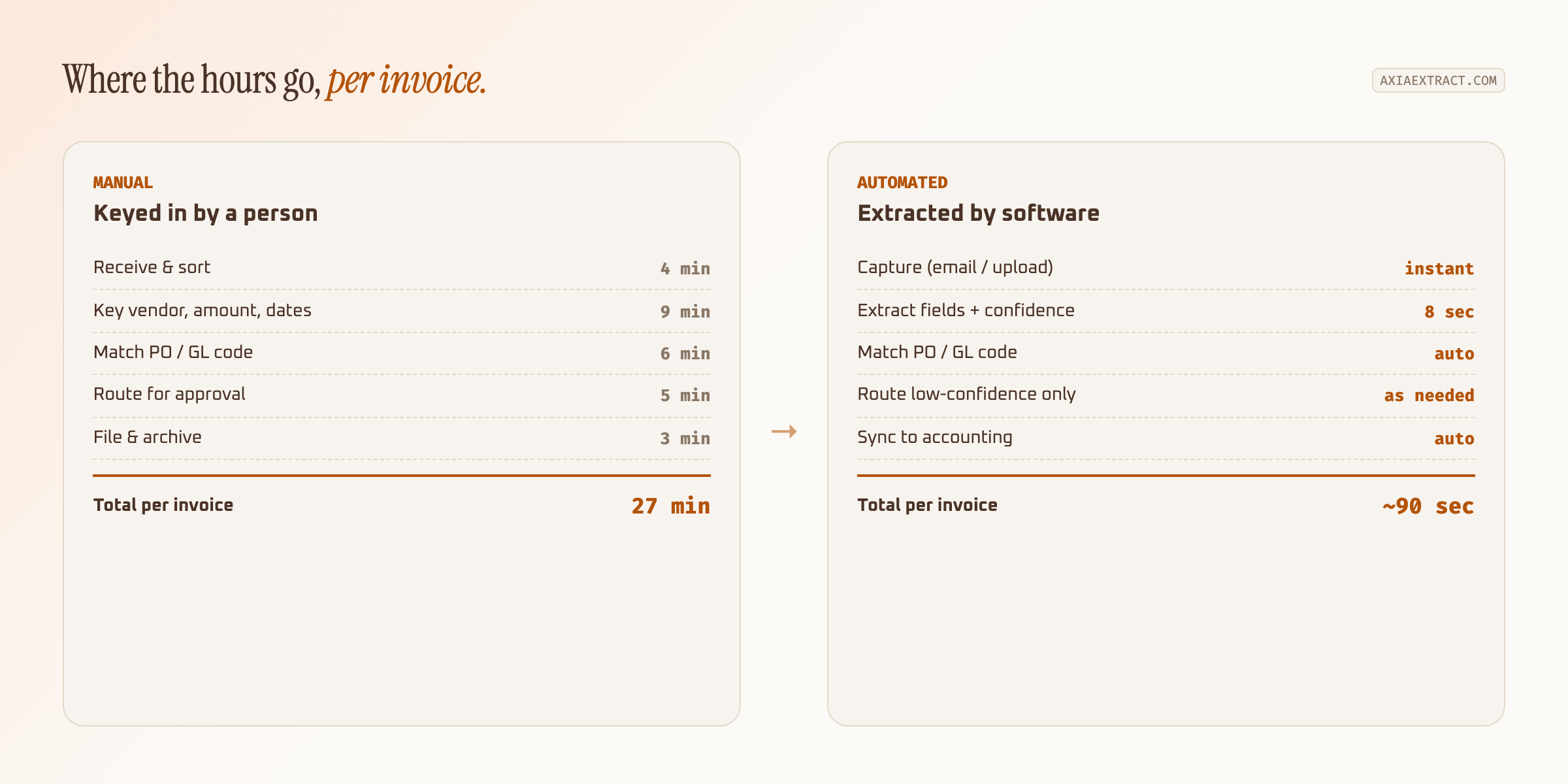
Multiply that by fifty invoices a month and you're looking at over 22 hours, more than half a working week, spent on data entry rather than anything that grows the business. That's before counting the rework when a mis-keyed total throws off a reconciliation at month end.
Signs manual invoice processing is holding you back
Not every business needs to automate invoice processing on day one. A handful of clear signals usually show up first:
- One person is the only one who knows where a given invoice stands, and vacations create a backlog.
- Late payment fees show up because an invoice sat in an inbox before anyone keyed it in.
- Month-end close routinely slips because reconciling AP against the bank statement means chasing down mis-entered totals.
- You're hiring, or considering hiring, specifically to keep up with data entry rather than higher-value bookkeeping work.
If two or more of those sound familiar, the math on invoice processing automation usually pays for itself inside the first billing cycle.
How invoice processing automation actually works
The mechanics are simpler than most owners expect. You define a schema, the handful of fields you actually need (vendor name, invoice number, total, due date, PO reference). The software reads incoming invoices against that schema, whether they arrive as an email attachment, a scanned PDF, or a phone photo from a supplier. Under the hood, this is invoice data extraction: the same underlying technology used for receipts and purchase orders, applied specifically to the fields an AP workflow cares about.
Every extracted field comes back with a confidence score, so the system tells you how sure it is rather than presenting a guess as fact. Fields above your threshold post straight to your accounting software. Fields below it get flagged for a person to glance at, usually a handful per batch rather than every line of every invoice.
Capture is the part small businesses worry about least and should worry about most. A tool that only accepts clean PDFs uploaded one at a time won't survive contact with real suppliers, who send scanned photos, forwarded email threads, and the occasional invoice typed into the body of an email rather than attached at all. Look for a setup where a dedicated inbox address does the sorting automatically, so nobody on your team has to manually funnel documents into the system every morning.
What to look for in invoice extraction software
Not every tool is built for small business volume. Some enterprise AP platforms require a multi-week implementation and a dedicated admin, which is overkill if you're processing a few hundred invoices a month. When you're comparing invoice extraction software, weigh it against your actual supplier mix rather than a generic feature list.
| What to check | Why it matters for a small business |
|---|---|
| No per-vendor templates | A new supplier shouldn't mean a setup project |
| Per-field confidence scores | Lets you skip review on the fields that are already accurate |
| CSV, JSON, or direct API export | Has to land in QuickBooks, Xero, or your spreadsheet without reformatting |
| Usage-based or low monthly minimum | Enterprise pricing rarely fits under a few thousand invoices a month |
| Published accuracy by field type | A single blended percentage hides where the tool actually struggles |
Pricing structure matters as much as the feature list. A flat annual contract sized for a hundred-person AP department rarely makes sense for a business processing forty invoices a month. Ask for a trial period long enough to run a full billing cycle through the system, not just a demo with sample data, before committing to anything longer than month-to-month.
Confidence scores, not blanket automation
The mistake teams make when they first automate invoice processing is treating it as all-or-nothing: either a person checks every invoice, or nobody checks any of them. Confidence-based routing avoids both extremes.
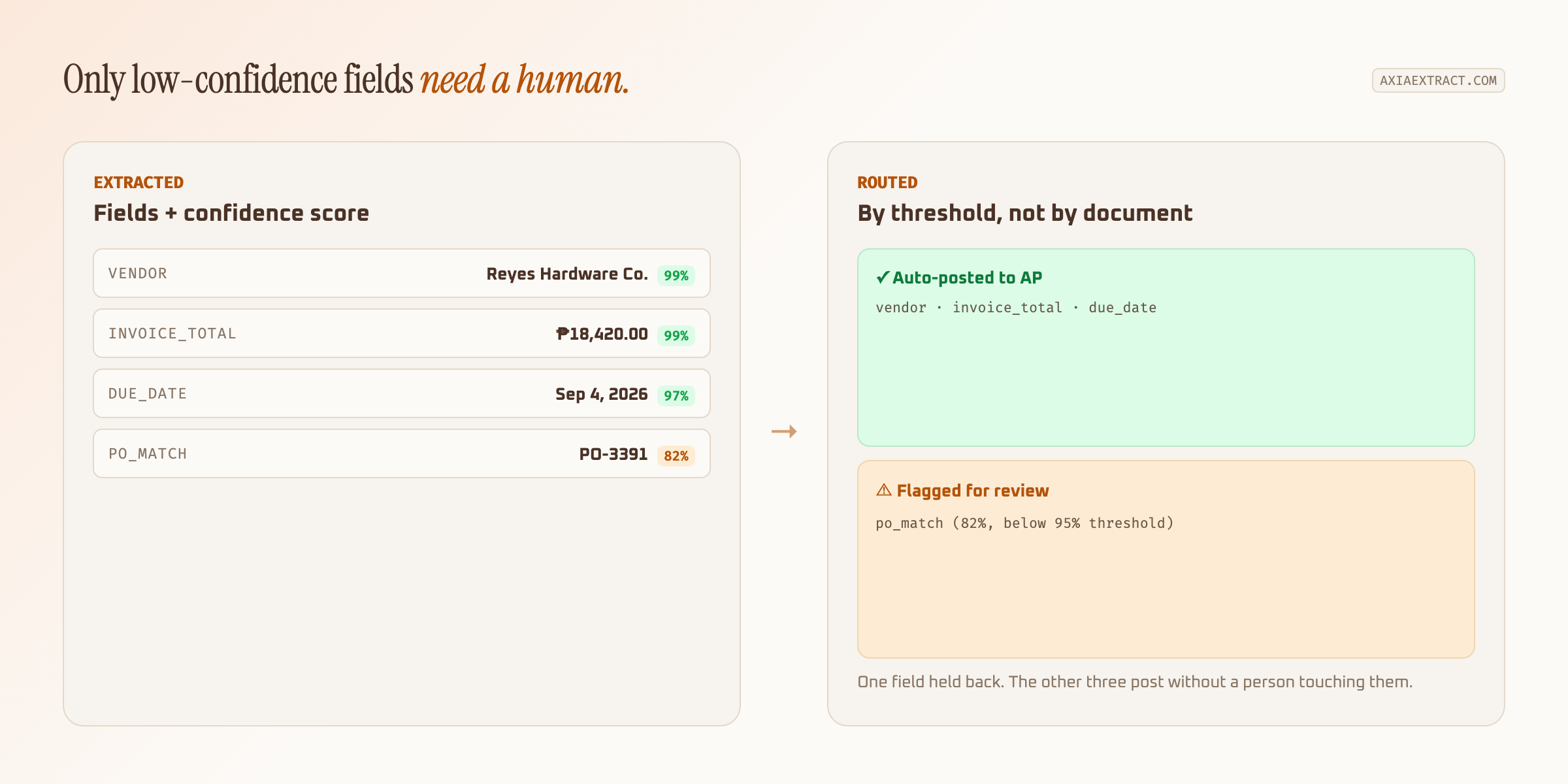
In practice, most invoices from a familiar supplier post without anyone touching them. A blurry photo or an unfamiliar layout might flag one field, a PO match or a handwritten note, while everything else still goes straight through. Review effort tracks actual risk instead of volume.
Automate one supplier relationship first, ideally your highest-volume vendor. Once the extracted totals match what your bookkeeper would have keyed by hand, widen it to the rest of your invoices.
Common concerns before switching
"What if the software gets a total wrong and nobody catches it" is the question that stops most small business owners from automating invoice processing in the first place. It's a fair worry, and confidence scoring exists specifically to answer it: a tool that hides its uncertainty is worse than no automation at all, but one that surfaces it lets you set a review threshold as conservative as you want on day one and loosen it as trust builds.
Vendor lock-in is the second concern. Before signing anything longer than a month, confirm you can export your historical extraction data in a plain format, not just push it into the vendor's own dashboard. A tool that only lets you view results inside its own interface makes switching later far more painful than it needs to be.
The third worry, that automation only works for clean, typed invoices and falls apart on the messy ones a small business actually receives, is worth testing directly rather than taking on faith. Run your worst documents (a supplier's handwritten delivery note, a photo taken at an angle) through before rolling out to your full volume. If the tool handles those acceptably, it will handle everything easier than that without issue.
Rolling it out without disrupting AP
Set an email address or upload folder as the intake point so suppliers don't need to change how they send invoices. Run a batch of real, including ugly, invoices through the schema before switching over fully. Crumpled receipts and handwritten forms tell you more about a tool's actual accuracy than a clean sample PDF ever will.
Keep your bookkeeper in the loop on the confidence threshold. If flagged invoices are piling up, the threshold is probably set too conservatively for your document quality, and it's worth loosening it once a few weeks of results confirm the extraction is holding up.
Track one number through the rollout: minutes spent per invoice, start to finish. It's the simplest way to prove automating invoice processing is actually working, rather than just assuming it because the software is running. If that number hasn't dropped after a month, the schema or the threshold needs adjusting before you add more suppliers to the pipeline.
For a deeper look at the accounts payable side specifically, including PO matching and approval routing, see our guide to invoice processing automation. If you want the accuracy numbers behind these claims before testing anything yourself, the full accuracy benchmarks break down performance by field type rather than a single headline percentage.
Automating invoice processing isn't about removing people from accounts payable. It's about spending their time on the handful of invoices that actually need a human, and letting the rest post themselves.