AI data extraction is the process of pulling structured fields out of unstructured documents using machine learning models instead of fixed rules. You define what you want (vendor name, invoice total, due date), and the model finds it wherever it happens to sit on the page.
That last part is the whole point. Older tools needed to be told the exact coordinates of every field. Move the total two centimetres left, and they returned nothing.
How AI data extraction actually works
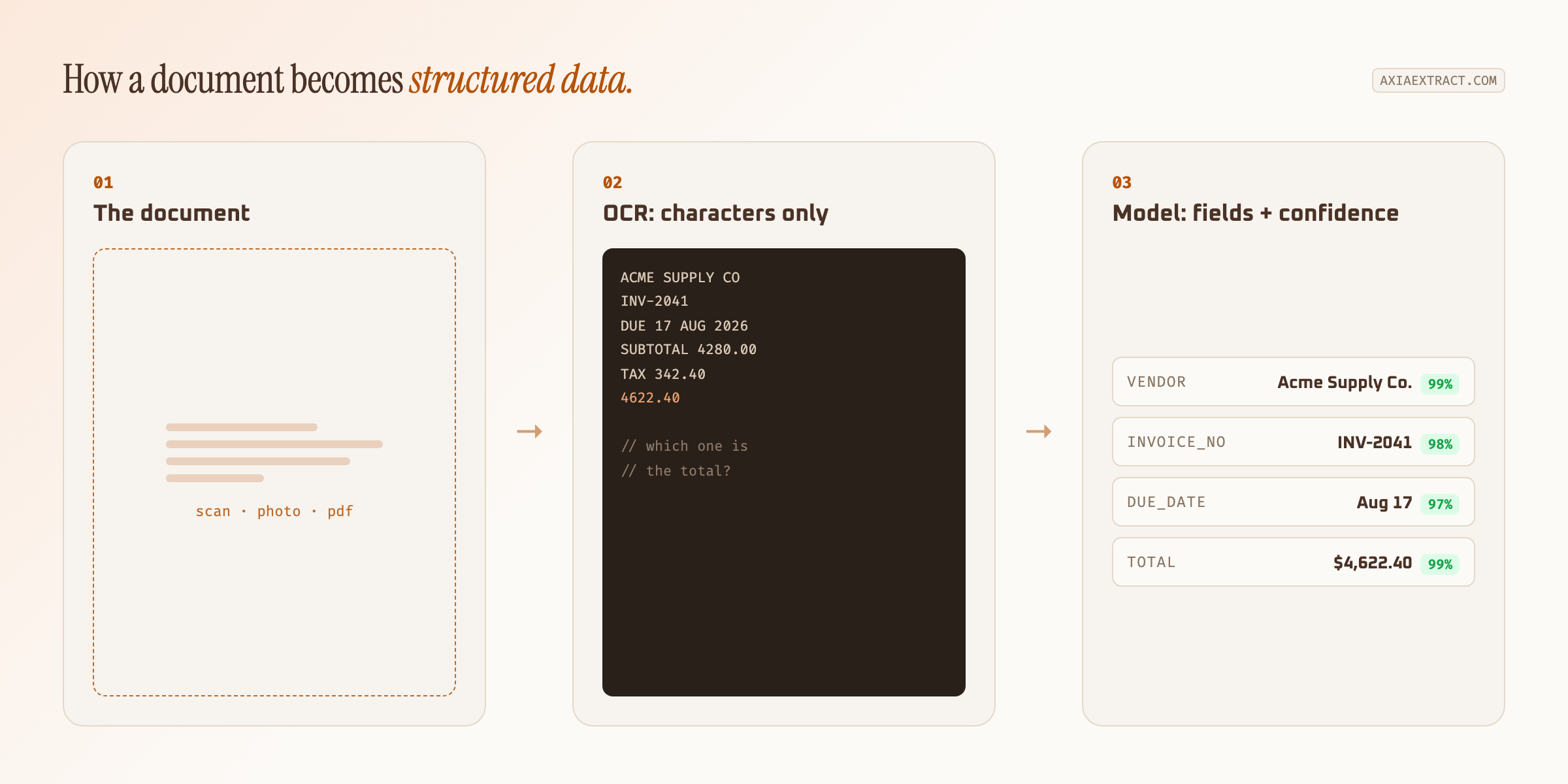
Three things happen in order. First, optical character recognition converts the pixels of a scan or photo into characters. Second, a model reads those characters in context and decides which ones belong to which field. Third, the system returns structured output with a confidence score attached to every value.
Step two is where AI data extraction earns its keep. OCR alone can tell you a page contains the string "$4,622.40". It cannot tell you that the number is the invoice total rather than the subtotal, the tax, or last month's balance. The model handles that judgement.
Where rules-based tools break
Template systems work beautifully on the layout they were built for. The trouble starts on document number two.
A vendor moves their logo. A new supplier sends a landscape invoice instead of portrait. Someone photographs a receipt at an angle. Each of those breaks a coordinate-based rule, and each one needs a person to notice and rebuild the template. Teams processing invoices from fifty suppliers end up maintaining fifty templates, which is its own full-time job.
AI data extraction sidesteps that maintenance entirely. The schema describes the fields once. The same schema then applies to any layout, including formats nobody has seen before.
That difference compounds. Adding a new supplier to a template system is a small project. Adding one to a model-driven pipeline is not a task at all, because nothing about the setup was tied to the old vendor's layout.
Judging accuracy honestly
Most vendors publish one accuracy number and leave it there. That number is close to meaningless without knowing which fields it covers and which documents it was measured on.
Clean typed invoices are easy. Handwriting is hard. Dates are harder than they look, because "03/04/25" is ambiguous before you know the locale. A single blended figure hides all of that.
| Field type | Accuracy | Why it varies |
|---|---|---|
| Financial totals | 99.9% | Rigid formatting, strong numeric context |
| Form fields | 98.2% | Predictable labels, varied placement |
| Dates | 96.3% | Ambiguous formats across regions |
| Handwritten names | 93.2% | Legibility varies per writer |
Those figures come from our own testing against SROIE2019, a public dataset of 347 real business receipts with mixed print quality. We publish the per-field breakdown and the schemas used in the full accuracy evaluation rather than a single headline percentage, because per-field numbers are the only ones you can plan around.
What comes out the other end
Extraction is only useful if the result lands somewhere your team already works. Most AI data extraction platforms export to CSV, JSON, or Excel, and expose a REST API for anything that needs to run without a person clicking a button.
The API route is what turns this from a tool into infrastructure. You post a document, the system processes it, and a webhook fires the moment results are ready. Accounts payable software, an ERP, or a plain database can consume that payload directly.
Batch behaviour matters too. Extracting one invoice is a demo. Processing four hundred on the first of the month, without the queue falling over or quietly dropping the last twelve, is the actual requirement.
Confidence scores matter more than averages
A 98% average still means roughly one field in fifty is wrong. If you cannot tell which one, you have to check all fifty, and the automation saved you nothing.
Per-field confidence solves that. Every extracted value returns its own score, so a total the model is unsure about gets flagged for review while the confident 95% flows straight through. Review effort then tracks actual risk instead of volume.
Run your ugliest documents first, not your cleanest. Any tool handles a crisp PDF. The ones that matter are the crumpled photo and the form somebody filled in by hand.
When you do not need it
If every document you process arrives in one format from one system, and that format never changes, a template is cheaper and faster. Structured data extraction using AI is worth it when variety is the problem.
The break-even point arrives sooner than most teams expect. Somewhere around five or six distinct layouts, template maintenance usually costs more than the model does.
Where to start
Pick one document type with real volume behind it. Invoices are the usual first choice for automated data extraction, because the return is easy to measure against hours of manual keying.
Define a small schema, five or six fields rather than thirty. Run a hundred real documents through it, including the awkward ones. Check the per-field confidence scores, then widen the schema once the core fields hold up.
If you want the mechanics in more depth, our guide to AI document extraction covers schema design and export options. And if you are still weighing this against conventional tooling, the comparison of traditional OCR, AI OCR, and GenAI OCR explains which generation fits which kind of document.