Bank statement OCR reads PDF, scanned, or photographed statements and returns structured transactions, balances, and account details instead of a wall of unlabeled text. For fintech and lending teams, that's the difference between a person manually re-keying three months of transaction history and a loan file that's ready for underwriting in under a minute.
Income and cash-flow verification is one of the last manual steps in most lending pipelines. Applications get submitted digitally, credit pulls happen through an API, but the bank statement, the document that actually shows whether someone can repay a loan, still gets opened, read, and keyed in by hand at a lot of shops. AI-powered OCR for bank statements exists specifically to close that gap.
Understanding OCR for bank statements
Plain OCR reads pixels into text. It can tell you a page contains the string "11,650.00" but not whether that's the closing balance, a single deposit, or a fee. Bank statement data extraction adds a layer on top that understands which number is which field, based on context rather than a fixed position on the page. That distinction matters more here than in most document types, since a single statement can carry dozens of visually similar dollar amounts.
Why fintech and lending teams need it
A few scenarios come up constantly across online lenders, BNPL providers, and cash-flow underwriting platforms:
- A digital lender processing hundreds of applications a week needs three to six months of statements read and reconciled per applicant, not just for approval but for ongoing risk monitoring.
- An alternative credit scoring platform builds its model on transaction patterns (recurring deposits, overdraft frequency, average balance), which requires transaction-level data, not just a closing balance.
- A merchant cash advance provider underwrites against daily cash flow, which means statements need to be re-processed monthly, at volume, without a manual bottleneck reappearing every cycle.
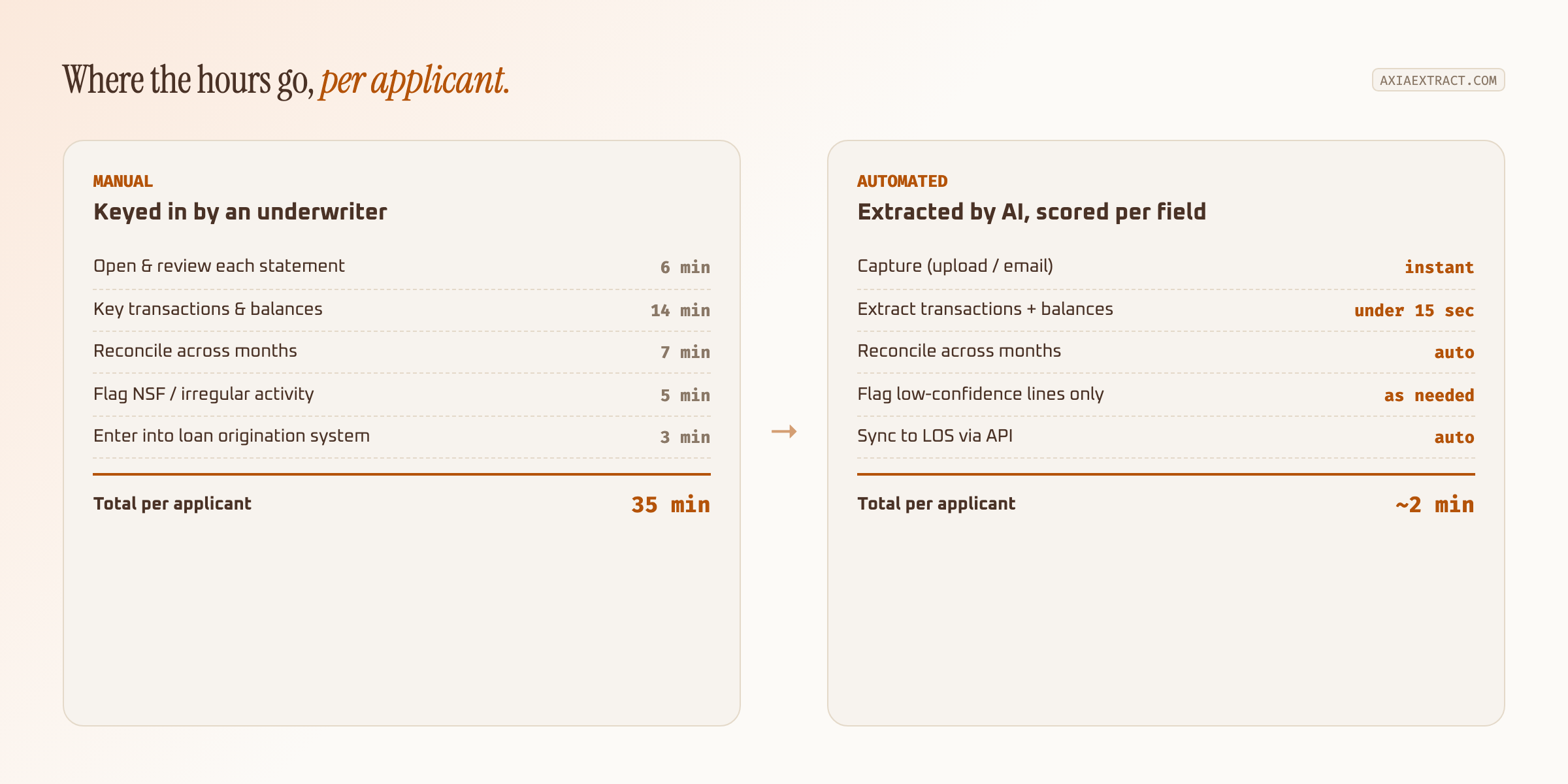
In each case, the applicant already has the document. The question is how fast and how accurately it becomes usable data. A BNPL provider underwriting a $400 purchase can't justify a human reviewing a statement for ten minutes; the economics only work if the read is close to instant. A commercial lender evaluating a $2 million line of credit has more time per file, but multiplies that across a portfolio that needs re-underwriting every quarter, which is its own volume problem.
There's a compliance angle too. KYC and AML reviews often require the source document to be retained and auditable alongside the extracted data, not just a summary a person typed from memory. Structured extraction with the original file attached gives an examiner a clean audit trail: here's the statement, here's exactly what was read from it, here's the confidence score behind each number.
How AI-powered bank statement OCR works
The workflow mirrors other document extraction use cases, but the schema is specific to lending: account number, statement period, opening and closing balance, and a transaction list with dates, descriptions, and amounts.
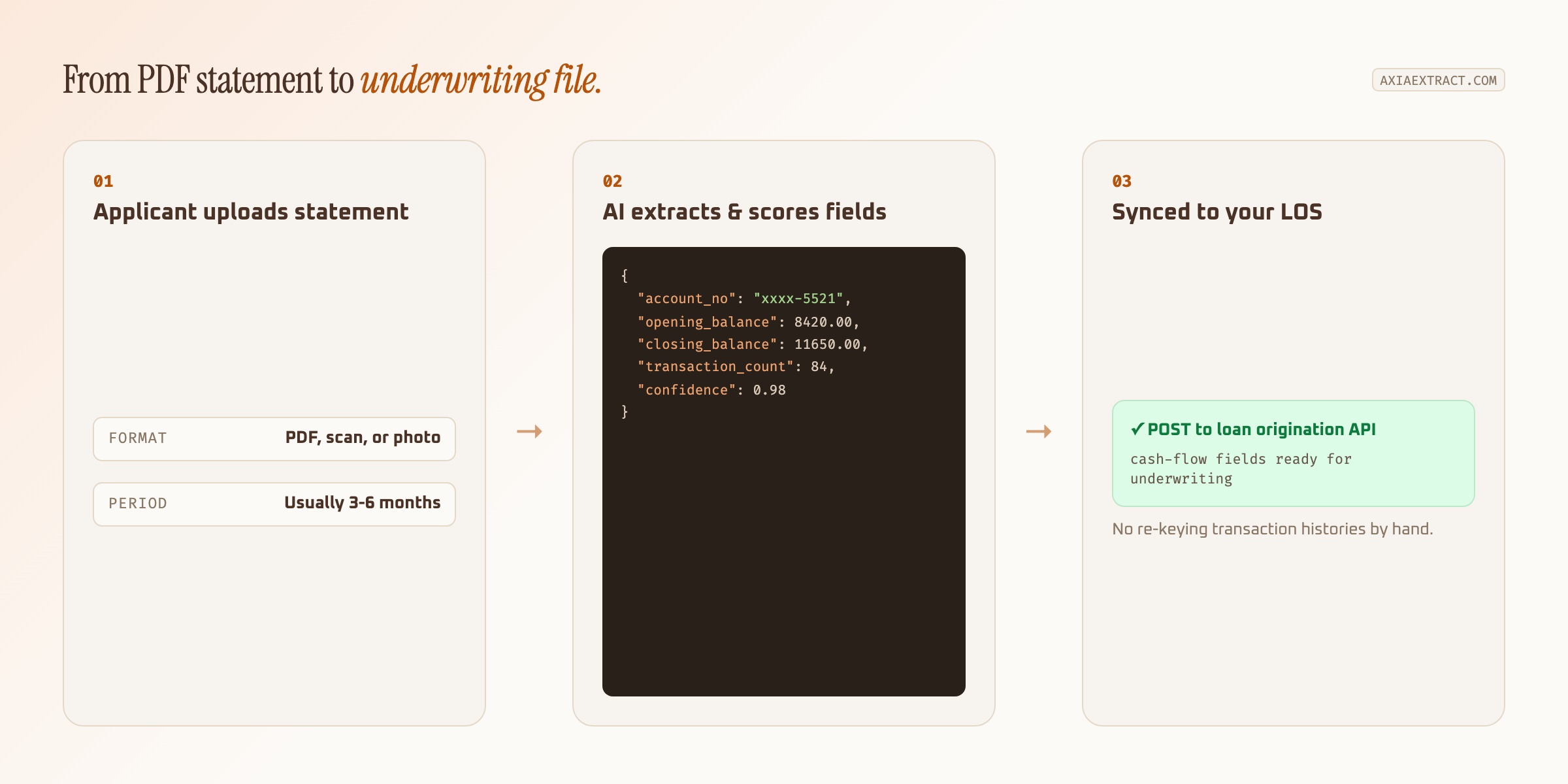
Every field returns with a confidence score. A closing balance that matches the sum of transactions posts automatically; a transaction count on a faded scan gets flagged for a person instead of silently guessing. That's the same confidence-based routing behind AI data extraction more broadly, applied to a document type where a missed decimal point has real underwriting consequences.
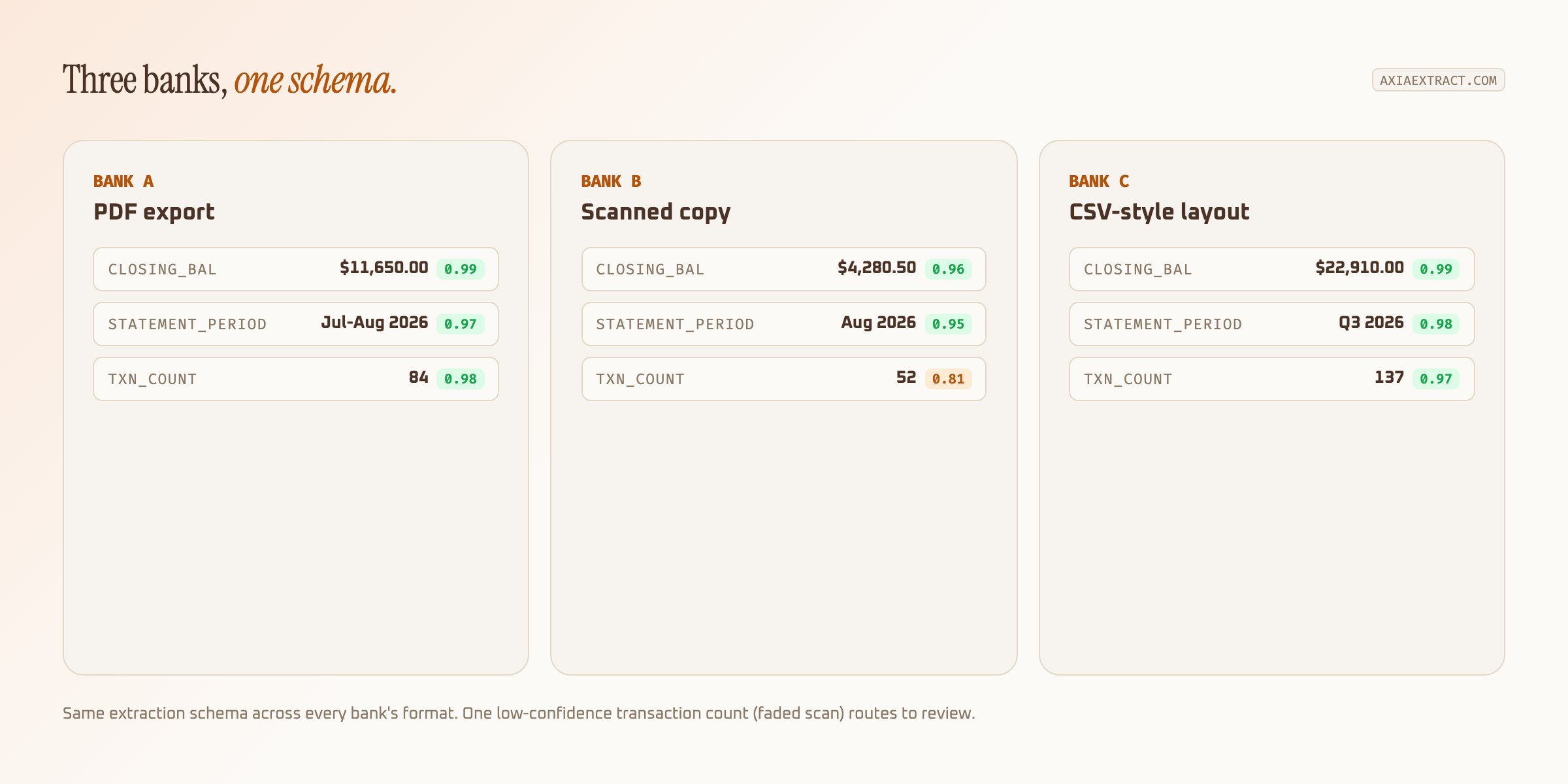
That last point is where template-based tools fall apart in lending specifically. A consumer lender might see statements from dozens of regional banks and credit unions in a single week, each with its own column layout. A schema-based model reads them all the same way; a tool built on fixed templates needs a new one per bank, which doesn't scale past a handful of institutions.
"We were re-keying transaction histories by hand for every loan file. Switching to AI extraction cut statement review from twenty minutes to under two, and the reconciliation errors basically disappeared." — underwriting operations lead, mid-size online lender
Relevant resources and technologies
Bank statement OCR sits next to a few adjacent technologies worth knowing before you pick a tool. Account aggregators like Plaid, MX, and Yodlee connect to an applicant's bank directly through consumer-permissioned APIs, no document involved, which is faster when it's available but depends on the applicant's bank being supported and willing to share login credentials. Document OCR fills the gap when neither is true, or when the applicant simply uploads a PDF as part of a manual file.
On the format side, older systems sometimes still exchange data as OFX or QFX files, or the SWIFT MT940 format used by commercial banks, rather than a human-readable PDF. A flexible extraction pipeline should handle the PDF and scan case well, since that's what most individual applicants actually submit, while still exporting to CSV or JSON for whatever system ingests it downstream. Regulatory momentum toward open banking, including the CFPB's personal financial data rights rule in the US, is pushing more standardized access to financial data industry-wide, but document-based statements remain the common path for a large share of applicants today.
| Approach | Best for | Tradeoff |
|---|---|---|
| Account aggregators | Applicants at large, well-covered banks who'll share login credentials | No coverage for smaller banks or credentials-averse applicants |
| Bank statement OCR | Any applicant who can upload a PDF, scan, or photo | Extraction quality depends on document quality |
| Manual review | Low volume, high-touch underwriting | Doesn't scale, inconsistent field-to-field |
Most lending platforms end up running a mix: aggregators where consented API access is available, document OCR everywhere else. The two aren't competitors so much as coverage for each other's gaps.
Why use Axia Extract
Axia Extract reads bank statements the same way it reads invoices, claims, and IDs: one schema, no per-bank templates, per-field confidence scores instead of a single blended accuracy number. On financial fields specifically, the numbers that matter most for underwriting, it averages 99.9% accuracy, with 96.3% on dates, both benchmarked on a public dataset rather than cherry-picked samples.
Results export as CSV, JSON, or through a direct REST API, so transactions and balances land in your loan origination or underwriting system without a manual export step. For a lending team processing statements at volume, that's the difference between automation that actually removes work and a tool that just moves the copy-pasting somewhere else.
Batch processing matters just as much as per-document accuracy at lending volume. A single applicant might submit six months of statements across two accounts; a portfolio review might mean re-processing thousands of files in one pass. Axia Extract accepts batches of hundreds of documents at once, up to 50MB each, so a monthly cash-flow refresh across a loan book doesn't turn into a queue someone has to babysit.
If you're comparing bank statement OCR against building an in-house parser or sticking with manual review, the fastest way to know which makes sense is to run your own applicants' statements through it, scanned copies and all, and look at where the confidence scores land. Building a parser in-house means owning every new bank layout as it appears; a schema-based extraction API absorbs that maintenance instead.