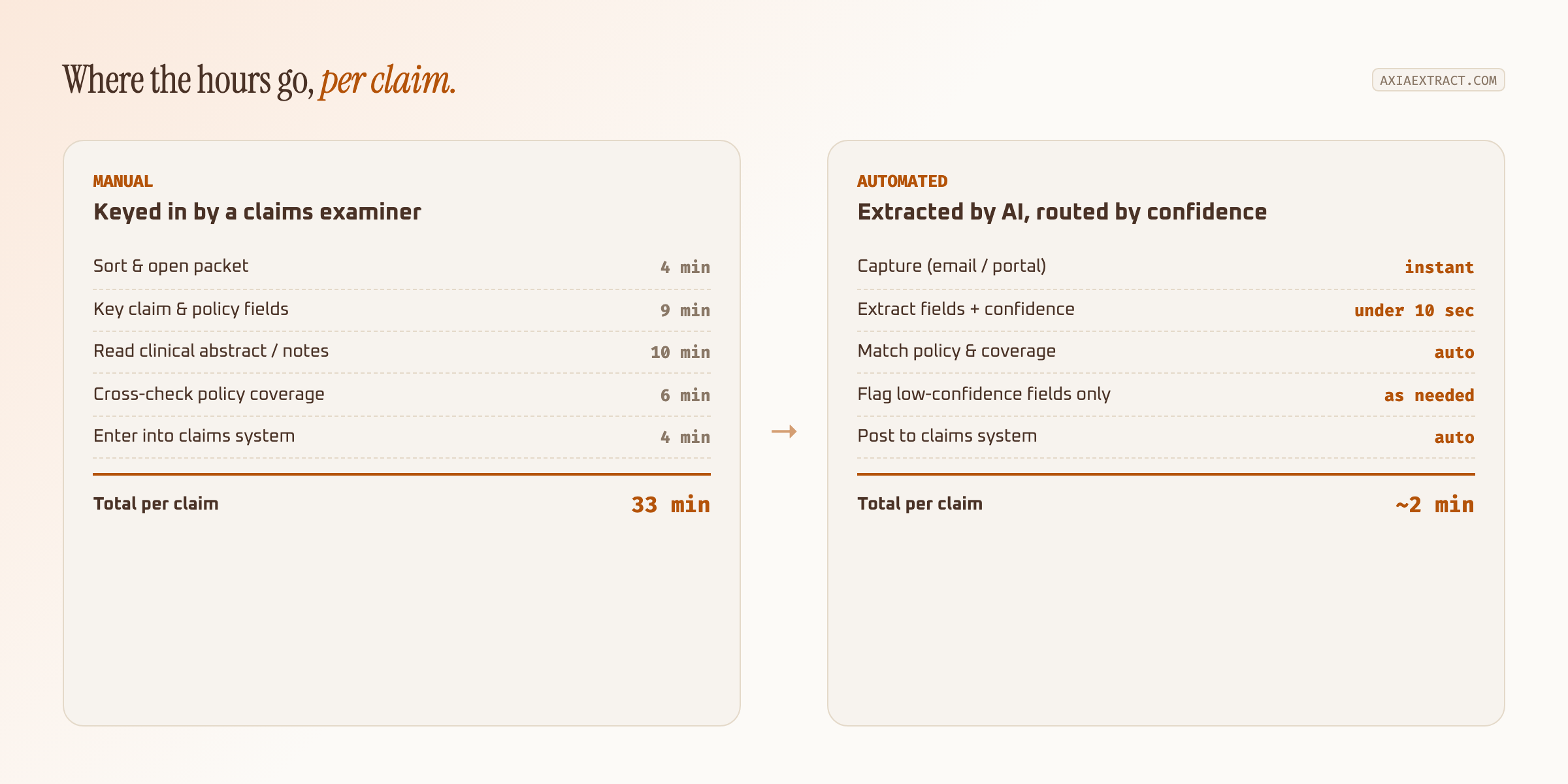
Insurance claims processing automation uses AI to read claim forms, policy documents, and supporting evidence, then hands adjusters structured data instead of a stack of PDFs to key in by hand. Most carriers save 20 to 30 minutes per claim on data entry alone, before counting the rework a mis-keyed field causes down the line.
That gap between reading a claim and understanding it is where most insurers lose time. A claims examiner doesn't need help finding text on a page. They need the claim number, the policy number, the loss date, and the amount pulled out correctly and matched to the right file, every time, regardless of which carrier's form it arrived on.
Why document processing is a bottleneck in insurance
A single claim rarely arrives as one clean document. It's a packet: an intake form, an estimate from a repair shop or contractor, photos, sometimes a clinical abstract or an EOB, occasionally a handwritten note from an adjuster's site visit. Each piece uses a different layout, and most of them were designed for a person to read, not a machine.
Multiply that by claim volume and the bottleneck becomes obvious. A mid-size carrier processing a few hundred claims a week can lose dozens of staff hours to manual data entry alone, and that's before the cost of a transposed policy number sending a payout to the wrong file. Insurance claims processing automation exists specifically to close that gap without adding headcount.
The knock-on effects show up outside the claims department too. Slow intake delays subrogation timelines, which delays recovery. Inconsistent data entry makes fraud patterns harder to spot, since a model or a reviewer can only cross-reference fields that were captured correctly in the first place. None of that is a training problem. It's a document processing problem, and it compounds with every claim that goes through the same manual path.
What is OCR in insurance claims processing?
OCR in insurance workflows converts data from documents like claims, policies, and forms into structured, usable information. On its own, OCR only reads pixels into text: it can tell you a page contains the string "$6,250.00" but not that the number is the claim amount rather than a deductible or a prior payout. That distinction is what actually matters for claims automation, and it's the layer plain OCR doesn't provide.
Traditional OCR vs. AI-powered IDP: what's actually different
Traditional OCR reads a fixed zone on the page, coordinates trained on one specific form layout. Change carriers, and the claim number moves two inches to the left, and the extraction breaks. AI-powered intelligent document processing (IDP) replaces coordinates with context: the model learns what a claim number, a policy number, or a loss date looks like regardless of where it sits, so a new carrier's form doesn't mean a new template. For a deeper breakdown of the three generations of document reading, see our comparison oftraditional OCR, AI OCR, and GenAI OCR.
How AI OCR works in an insurance claims workflow
The mechanics are simpler than the term "intelligent document processing" suggests. You define the schema, the fields a claim actually needs (claim number, policy number, loss date, claimant, amount). The system reads incoming claim packets against that schema regardless of format, whether they arrive as a portal upload, an email attachment, or a faxed scan.
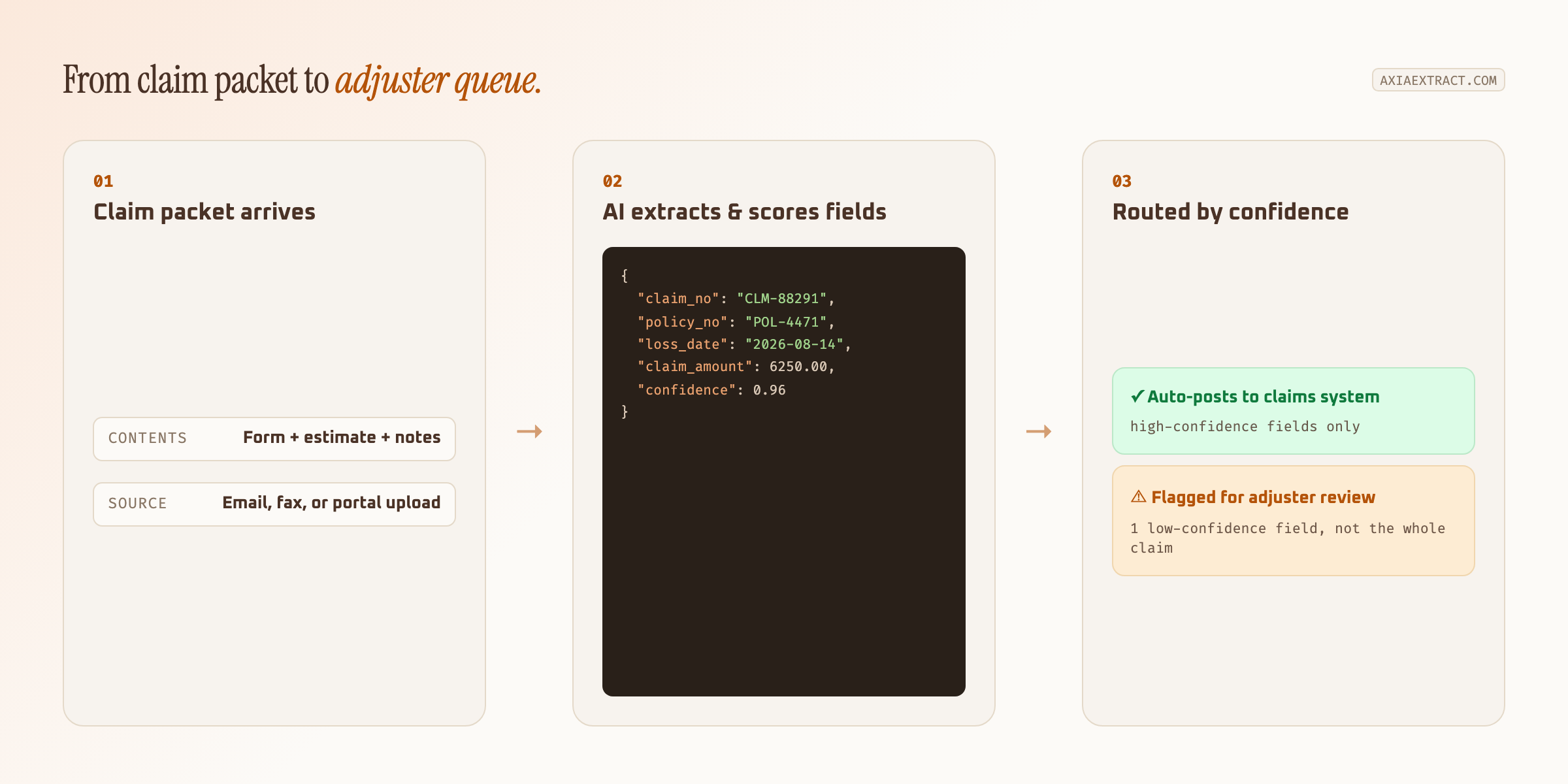
Every extracted field comes back with a confidence score instead of a flat guess. High-confidence fields, a clearly typed claim number, an amount that matches the estimate, post straight to the claims system. Low-confidence fields, a smudged policy number or a handwritten note, get flagged for a person instead of quietly getting it wrong. That routing is what separates real AI data extraction from OCR that just dumps text and hopes.
What makes insurance documents difficult for OCR
Insurance is one of the harder document categories for extraction, specifically because so few of the inputs are standardized. A table helps show why:
| Document | Fields needed | Why it's hard for OCR |
|---|---|---|
| Claim intake forms | Claim number, policy number, loss date, claimant | Layout differs by carrier, line of business, and state |
| Repair or contractor estimates | Line items, labor, parts, total | Every shop formats an estimate differently |
| Clinical abstracts & notes | Diagnosis codes, dates, provider names | Dense text, medical shorthand, often handwritten |
| Adjuster field notes | Damage description, cause, recommendation | Handwritten, legibility varies by adjuster |
| Explanation of benefits (EOB) | Billed amount, allowed amount, payment | Dense tables, small fonts, inconsistent columns |
Template-based OCR needs a separate configuration for every row in that table, per carrier, per form version. AI-powered claims processing automation reads all five off the same schema because it's matching meaning, not coordinates.
Where claims automation creates the most value
Not every part of the claims lifecycle benefits equally from automation. Intake and first notice of loss (FNOL) see the biggest gains, since that's where the volume of unstructured documents is highest and the fields needed are the most consistent across claim types.
Subrogation and fraud review benefit differently: less about speed, more about consistency. A model applies the same extraction logic to every claim, which makes it easier to flag mismatches (an estimate total that doesn't reconcile with line items, a policy number that doesn't match the claimant on file) that a tired examiner might miss on claim four hundred of the week.
How to evaluate OCR accuracy for insurance claims
Accuracy claims in this space are easy to inflate and hard to verify. Before trusting a headline number, check it against a few specifics:
| What to check | Why it matters for claims |
|---|---|
| Accuracy broken out by field type | A blended percentage hides weak spots on handwriting or dense tables |
| Per-field confidence scores | Lets adjusters review only what's actually uncertain |
| Benchmarked on a public dataset | Vendor-selected samples can't be independently checked |
| Handles handwriting and low-quality scans | Faxed and photographed claim documents are the norm, not the exception |
| Structured export or API | Results need to land in the claims management system, not a vendor dashboard |
On the numbers: Axia Extract publishes 98.2% average field accuracy on the public SROIE2019 dataset, 99.9% on financial totals specifically, 93.2% on handwritten fields, and 96.3% on dates. Ask for the equivalent breakdown from any vendor before signing, and see thefull accuracy benchmarks for the methodology behind those numbers.
Where OCR still falls short
Even strong AI OCR software has limits worth planning around. Extremely dense clinical abstracts with heavy medical shorthand still benefit from a second set of eyes. Multi-page claim packets with inconsistent scan quality (a phone photo of a faxed copy of a printed form) push confidence scores down across the board, which is the system correctly admitting uncertainty rather than a failure. And no OCR tool, however good, replaces the judgment call on whether a claim is valid. It only removes the keying that used to stand between the document and that decision.
Choosing the best insurance claims processing OCR software
The intelligent document processing category has several vendors built specifically for high-volume, regulated documents.Infrrdand Hyperscience both publish their own claims and insurance-focused IDP research, and are worth a look alongside Axia Extract if you're comparing options. What separates a tool that scales across your claims volume from one that doesn't usually comes down to the same handful of questions: does it need a new template for every carrier's form, does it surface confidence per field, and does its accuracy hold up on the handwritten and low-quality documents you actually receive rather than the clean sample PDF in the demo.
Pricing structure matters too. Enterprise IDP platforms built for Fortune 500 claims volume often carry a multi-week implementation and a dedicated administrator, which is more infrastructure than a mid-size carrier or MGA needs. Ask for a trial period long enough to run a real batch of claims, including the messy ones, before committing to anything beyond month-to-month. Integration effort deserves the same scrutiny as accuracy: a tool that only exposes results through its own dashboard means someone still has to copy values into the claims management system by hand, which defeats the point of automating in the first place.
Summary
Insurance claims processing automation isn't about replacing adjusters. It's about removing the 20 to 30 minutes of manual keying that sits between a claim packet landing in an inbox and an adjuster actually working the file, and routing only the genuinely uncertain fields back to a person. Start with FNOL and intake, where volume is highest and documents are most consistent, verify accuracy on your own claim forms and clinical abstracts before rolling out further, and widen from there.