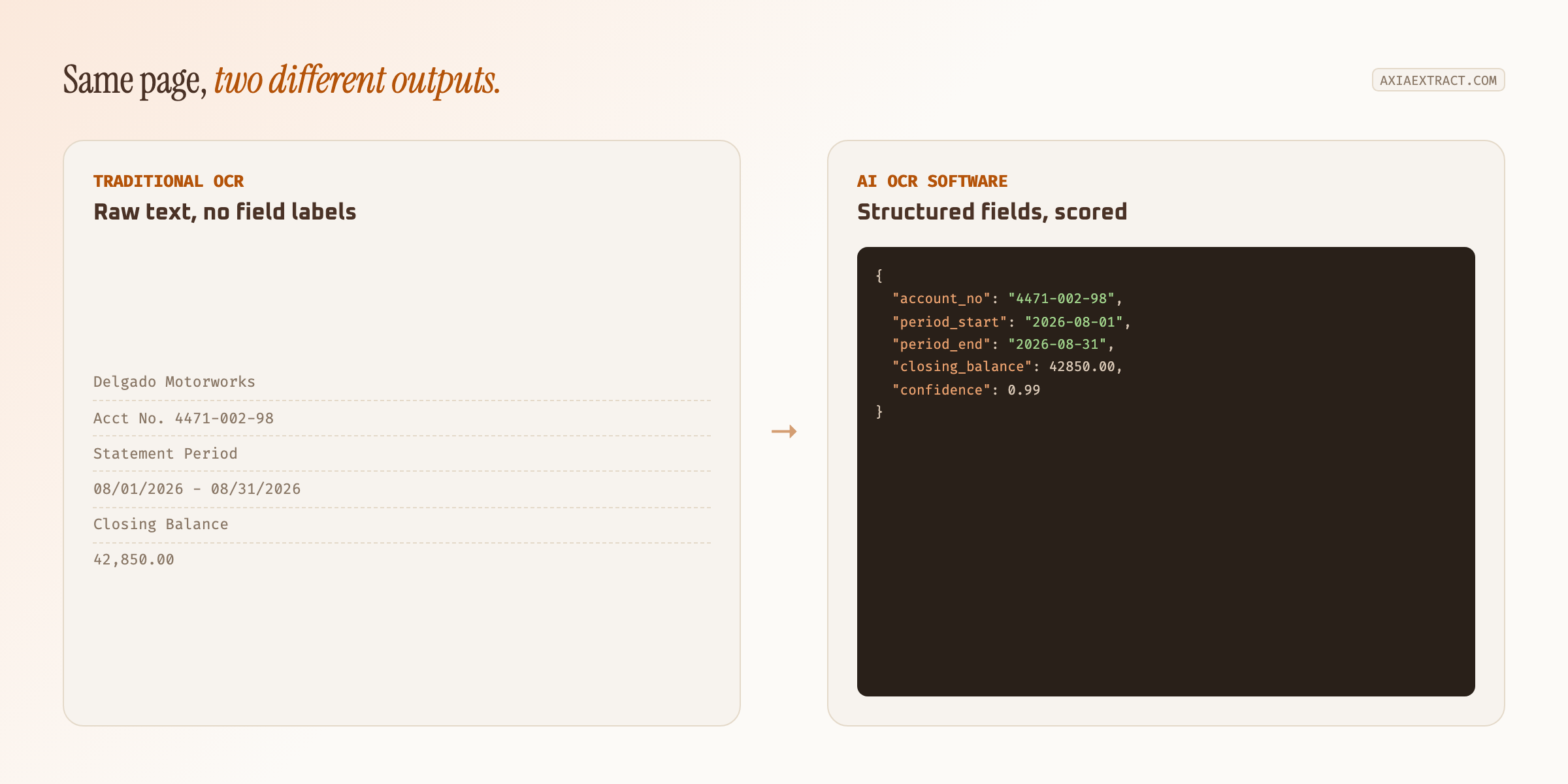
AI OCR software reads a document's text the way traditional OCR does, then adds a layer that understands which text belongs to which field. That's the difference between getting back "$4,622.40" and getting back an invoice total you can post straight to your books.
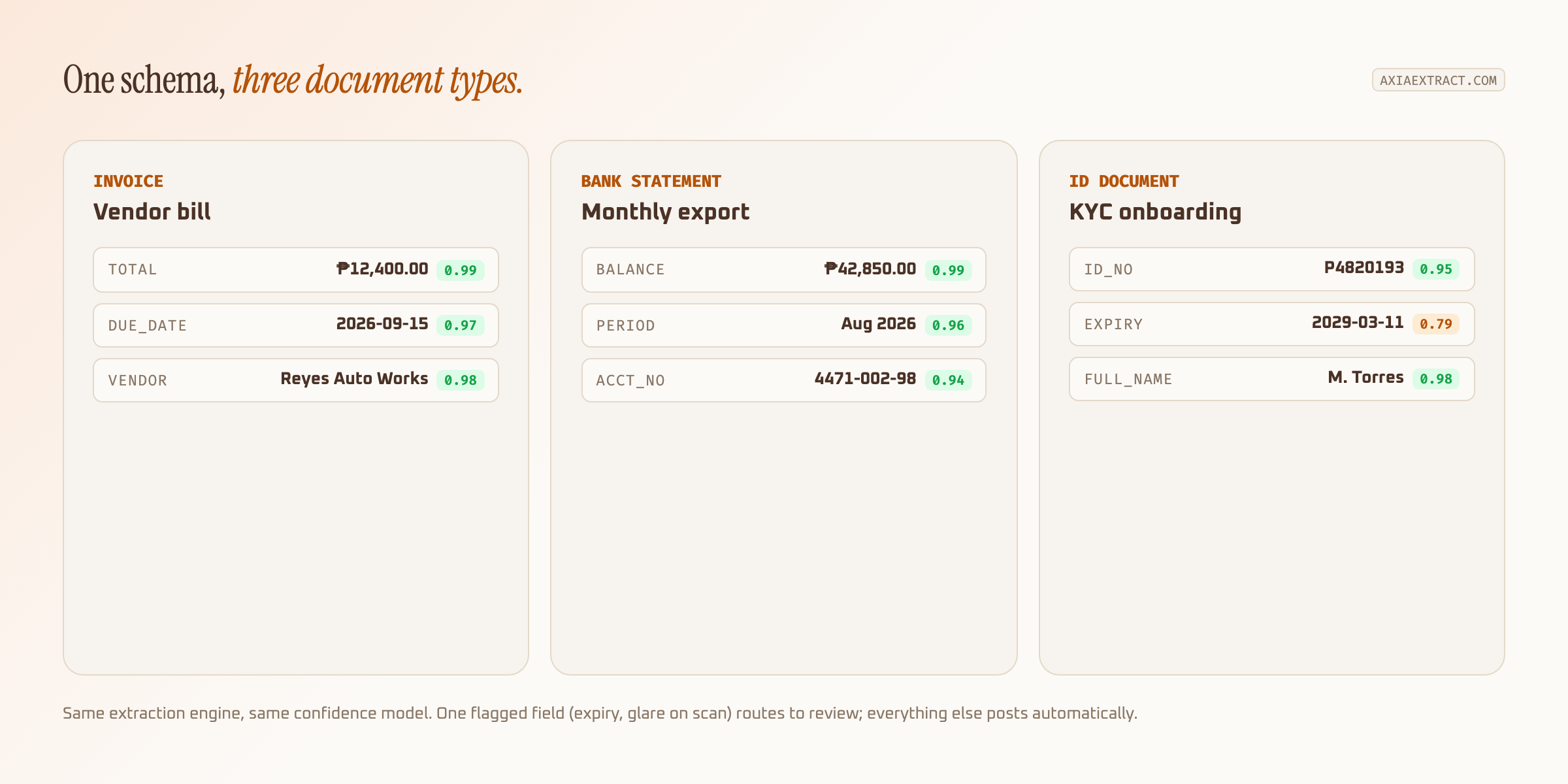
Most companies that ask about AI OCR software aren't dealing with one document type. They're managing invoices, bank statements, and IDs for onboarding, each with a different layout and a different reason it needs to become structured data. One extraction engine that handles all three beats three separate tools bolted together.
Why plain OCR isn't enough for business documents
Traditional OCR was built to convert pixels into characters. It does that well on a clean, typed page and badly on anything else: a bank statement with columns that don't align, a receipt photographed at an angle, an ID card where the expiry date sits in a different spot on every issuer's layout. The text comes out, but nothing tells you which line is the account number and which is the routing number.
That's the gap AI OCR software closes. Instead of matching text to fixed coordinates on a template, the model learns what an invoice total, a statement balance, or an ID number looks like in context, so it still finds the right field when the layout shifts. For a deeper breakdown of where template OCR breaks and what replaces it, see our comparison oftraditional OCR, AI OCR, and GenAI OCR.
Three document types, one extraction problem
Invoices, bank statements, and ID documents look unrelated on the surface. Underneath, they're the same problem: unstructured text that needs to become structured fields, reliably, across documents that never look exactly alike twice.
| Document | What AI OCR software pulls | Why layout breaks fixed templates |
|---|---|---|
| Invoices | Vendor, invoice number, line items, total, due date | Every supplier's invoice layout is different |
| Bank statements | Account number, statement period, transactions, closing balance | Each bank formats columns and headers differently |
| IDs & KYC documents | Name, ID number, date of birth, expiry date | Field position varies by issuer and country, not a fixed grid |
Invoice extraction is the most common entry point, since AP teams feel the manual cost fastest. If that's your use case specifically, our guide to automating invoice processing for small business covers the AP workflow in more depth than this piece does.
How AI OCR software handles messy real-world scans
Business documents rarely arrive clean. Bank statements get exported as low-resolution PDFs, invoices come in as phone photos taken at an angle, and IDs submitted for onboarding get photographed under bad lighting with a glare across the laminate. AI OCR software has to hold up against all of that, not just the sample PDF a vendor demos with.
Confidence scoring is what makes that workable in practice. Every extracted field comes back with a score instead of a flat guess. High-confidence fields, an invoice total that matches the line items, a clearly printed ID number, post automatically. Low-confidence fields, a smudged account number or a glare-obscured expiry date, get flagged for a person instead of quietly getting it wrong. That's the same principle behind AI data extraction more broadly: review effort should track actual risk, not document volume.
What to check before choosing AI OCR software
Not every AI OCR tool is built to span multiple document types. Some are tuned narrowly for invoices and struggle the moment you point them at a bank statement or an ID document. A few things separate a tool that scales across document types from one that doesn't:
- No per-document-type templates required. If adding a new bank's statement format means a setup ticket, the tool isn't really AI-driven.
- Per-field confidence scores, not a single blended accuracy percentage for the whole document.
- Structured export via CSV, JSON, or a REST API, so results land in your accounting or onboarding system without manual reformatting.
- Published accuracy numbers by field type, ideally benchmarked against a public dataset rather than the vendor's own cherry-picked samples.
On that last point: worth asking any vendor for numbers, not marketing language. Axia Extract publishes 98.2% average field accuracy on the public SROIE2019 receipt dataset, 99.9% on financial totals specifically, and 93.2% on handwritten names, the field type every AI OCR tool struggles with most.
Rolling out AI OCR software without disrupting your team
Start with one document type and one intake point, an email inbox for invoices or an upload folder for scanned statements, rather than trying to automate everything on day one. Run a batch of real documents, including the ugly ones, through before switching over fully. A crumpled receipt or a glare-obscured ID scan tells you more about how AI OCR software actually performs than a clean demo sample ever will.
Once one document type is running cleanly and the confidence threshold is tuned to your data, adding the next one (statements after invoices, IDs after statements) is a matter of defining a new schema, not standing up a new tool. That's the advantage of choosing AI OCR software built for structured extraction generally, instead of a point solution for a single form.